Why Digital Work Orders Fail in Hot Truck Cabs
Key Highlights
- Apple rates iPad to operate in ambient temperatures from 32° to 95°F, and summer truck cabs and dashboards often run hotter than that.
- Rugged cases protect against drops and water, but they can also trap heat and speed up thermal shutdown.
- Active cooling, smart charging and secure mounting keep field tablets running for the whole shift.
The software has never been better. Digital work orders, GIS layers, outage management, inspection forms and real-time dispatch now live on one tablet that rides along in every truck. For many utilities, that tablet has become the main link between the office and the field. That also makes it a single point of failure.
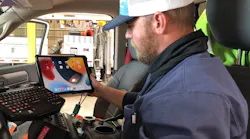
When a line crew pulls up to a job on a July afternoon, the iPad on the dash or seat may have been sitting in direct sun for hours. Apple rates the iPad to operate in ambient temperatures between 32° and 95°F, and Apple's own guidance warns against leaving devices in parked cars because temperatures there can exceed that range. When the device gets too hot, it protects itself. The screen dims, charging slows or stops, and performance drops. Eventually a temperature warning appears and the tablet won't work until it cools down. The work order, the map and the as-built photos all go dark with it.
Crews adapt the way crews always do. They tuck tablets under seats, leave the truck idling with the AC on, carry paper backups, or call the office for information they should already have. Each workaround eats into the return on the software and takes time away from the job.
The cost doesn't show up on the software dashboard
A tablet that shuts down in the afternoon rarely gets logged as an IT problem. It shows up somewhere else. A crew that can't open the work order waits on a callback from dispatch. A truck left idling to keep the cab cool burns fuel and adds engine hours. A damage assessment written on paper has to be re-entered later, and details get lost along the way. Photos that should have been attached at the pole end up on a personal phone, or don't get taken at all.
Over time, the bigger cost is trust. When crews learn that the tablet can't be counted on by mid-afternoon, they stop reaching for it first. Adoption numbers slip, data comes in late or incomplete, and the business case that justified the software starts to look weaker than it really is. The problem isn't the application. It's the hardware environment the application has to run in.
Storm restoration raises the stakes. Crews work long shifts, move between outages quickly and depend on accurate maps and job details, especially when mutual assistance crews are working unfamiliar territory. A tablet that can't keep up becomes a bottleneck at exactly the wrong time.
Why rugged isn't the same as heat-ready
Most utility fleets already buy rugged cases, and they should, because drop and water protection matter in the field. But a thick protective shell also acts as insulation. It holds heat against the device and does nothing to get rid of it. A tablet can survive a fall from a bucket and still be useless by 2 p.m. because it can't shed heat fast enough to keep running.
Charging makes it worse. Batteries make heat while they charge, and a device that's already hot will often stop charging altogether. So the tablet that sat on the dash or seat all morning can be overheated and low on battery at the moment a crew is heading into a long restoration shift.
What reliable field hardware looks like
Keeping tablets running in a truck takes three things working together. The first is active thermal management: airflow that pulls heat away from the device, not just a case wrapped around it. The second is smart charging, meaning power delivery that adjusts to the device's temperature so it keeps charging safely instead of cutting in and out. The third is secure mounting that holds the tablet where the driver can see it, charges it automatically when it's docked, and locks it down when the truck is left unattended.
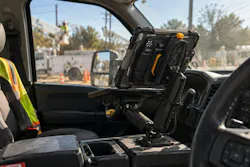
X-naut designs iPad cooling and mounting systems around those three needs for high-heat work. The X90 locking case pairs heat management with smart charging, and it mounts to the center console on an articulating arm. That puts the screen within reach of the driver and passenger and gets the tablet off the seat for good. For crews who spend real time on work orders and reports in the cab, an attached keyboard platform turns the tablet into an in-truck workstation, so long entries don't get typed one finger at a time on glass. During storm restoration, the MagPower magnetic dock lets a troubleshooter lift the tablet off the mount, walk a downed span to log damage and photos for the assessment, then set it back on the dock to charge on the drive to the next outage. When the truck is parked, a separate, deliberate lock secures the case to the mount.
Questions to ask before the next device refresh
Start with the crews. Ask when their tablets fail, where in the truck they keep them, and what they do when one goes down. Their answers will usually point straight at the problem.
Then look at the hardware in the cab. Does the case or mount do anything to move heat away from the device, or does it only protect against impact? Does charging continue when the tablet is warm, or does it cut out on hot days? Can a crew member take the tablet out of the truck for a walk-down and put it back without fumbling with cables? When a crew needs to write up a full report, do they have a real keyboard in the cab, or are they typing on the screen? Is it secured when the truck sits at a job site or in the yard overnight? And does the mounting work across the whole fleet, from pickups to bucket trucks, so every crew gets the same setup?
These questions belong in the same conversation as software selection, not after it. A mobile workforce platform is only as useful as the device that runs it, and that device lives in one of the harshest work environments in the utility.
The bottom line
Utilities judge mobile workforce programs by adoption, data quality and time saved per job. None of those numbers hold up when the tablet shuts down at noon. Before the next software rollout or device refresh, ask the crews who use these tablets every day a simple question: does it make it through the shift?
This content is sponsored by: